
The Complete Guide to NFC Business Cards (2026) | businesscardX
Travis TrimRoughly 7 billion business cards are printed worldwide every year.[1] The vast majority of those cards are discarded shortly after being received — tossed into a drawer, left in a pocket, or thrown away before the connection they were meant to create ever happens.
NFC business cards solve this problem entirely. Instead of handing someone a piece of paper they'll likely lose, you tap your card to their phone and your full digital profile appears instantly — complete with your photo, contact details, social links, portfolio, and a one-tap button to save you as a contact. No app required. No typing. No searching through a pile of cards after a conference.
This guide covers everything you need to know about NFC business cards: how the technology works, which phones support it, how they compare to paper cards and QR codes, what to look for when choosing one, and how to get started.
Table of Contents
- What Are NFC Business Cards?
- How Does NFC Technology Work?
- What Happens When Someone Taps Your Card?
- Which Phones Support NFC?
- 7 Benefits of NFC Business Cards
- NFC Business Cards vs. Paper Business Cards
- NFC vs. QR Code Business Cards
- What to Look for When Choosing an NFC Business Card
- NFC Business Cards for Teams
- How to Set Up Your NFC Business Card
- Frequently Asked Questions
- Getting Started with businesscardX
- Sources & References
What Are NFC Business Cards?
An NFC business card is a physical card — typically made from PVC, metal, or wood — with a tiny NFC (Near-Field Communication) chip embedded inside. When someone holds their smartphone near the card, the chip transmits a URL that opens your digital profile in their phone's browser. From there, they can view your contact information, tap to save it, visit your social profiles, or explore your portfolio.
The key difference from a traditional paper business card: your information is always up to date. If you change jobs, get a new phone number, or add a new social profile, you update your digital profile once and the card automatically reflects the change. No reprinting. No running out. No waste.
NFC business cards combine the tangible, memorable experience of handing someone a physical card with the power and flexibility of a digital profile. You still get the handshake moment at a conference or meeting — but what the other person receives is infinitely more useful than a piece of cardstock.
How Does NFC Technology Work?
NFC stands for Near-Field Communication. It's a wireless communication protocol that operates at 13.56 MHz — the same globally unlicensed radio frequency band used by contactless payment systems like Apple Pay and Google Pay.[2] The technology is standardized under ISO/IEC 18092[3] and ISO/IEC 14443,[4] and is governed by the NFC Forum, a non-profit industry association founded on March 18, 2004, by NXP Semiconductors (then Philips), Sony, and Nokia.[5]
Here's the critical thing to understand: NFC doesn't use radio wave propagation like WiFi or Bluetooth. Instead, it uses magnetic field induction between two loop antennas — effectively creating a tiny air-core transformer.[2] This is why NFC only works at very close range (typically under 4 cm / 1.5 inches) and why it's inherently more secure than longer-range wireless technologies.
The Three Components
- The NFC tag — A small, thin chip with a tiny antenna coil. In an NFC business card, this is embedded between the layers of the card. The chip contains a small amount of memory (typically 144 bytes to 8 KB) that stores a URL pointing to your digital profile.[6]
- The NFC reader — The NFC antenna in the other person's smartphone. Every modern smartphone has one built in.
- The magnetic field — When the phone gets close enough, its NFC reader generates an alternating magnetic field at 13.56 MHz. This field inductively couples with the tag's antenna coil, which accomplishes two things simultaneously: it powers up the tag (no battery needed) and establishes a data connection.[2]
The entire interaction — power transfer, data exchange, and URL transmission — happens in under 0.1 seconds.[7] The phone recognizes the NFC tag, reads the stored URL, and presents a notification asking if you'd like to open it. One tap and you're viewing the person's full profile.
Why No Battery Is Needed
This is one of the most common questions about NFC business cards. The answer lies in the physics of inductive coupling. The phone's NFC reader is an active device — it generates the electromagnetic field and provides the power. The NFC tag in your business card is a passive device — it draws its operating power entirely from the reader's field.[2] This means the tag has no battery, no moving parts, and essentially no lifespan limit. A well-made NFC business card will function for 10+ years without degradation.
The ISO/IEC 18092 standard supports NFC data transfer at rates of 106, 212, or 424 kbit/s.[3] For a business card that only needs to transmit a short URL (typically under 100 bytes), this is more than sufficient — the transfer is virtually instantaneous.
What Happens When Someone Taps Your Card?
The user experience is simple and consistent across both iPhone and Android:
- You hold out your card. The other person holds the back of their phone near the card (within ~3 cm). No need to unlock the phone on most Android devices. iPhones require the screen to be on.
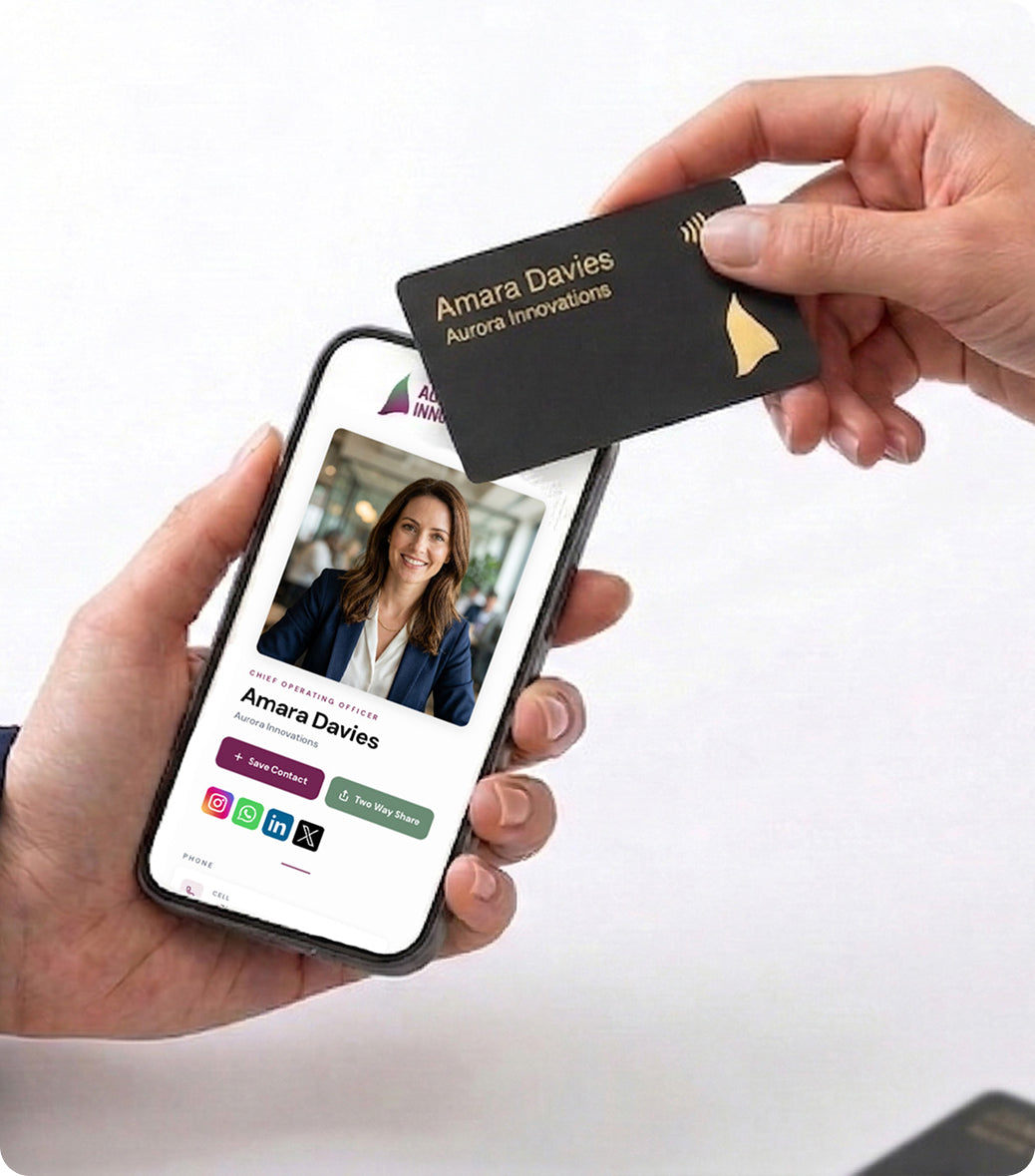
- A notification appears. The phone detects the NFC tag and shows a notification or banner with the URL stored on the chip (e.g., "Open businesscardx.com/john-smith").
- They tap the notification. Their default browser opens and loads your full digital profile.
- Your profile displays. They see your photo, name, title, company, bio, contact details, social links, portfolio, location map, and anything else you've configured.
- They save your contact. A prominent "Save Contact" button downloads a vCard (.vcf file) directly into their phone's contacts. Your photo, name, phone, email, company, and title are all saved in one tap.
The person receiving your card does not need any app installed. This is a crucial advantage over app-based digital business card solutions. The profile loads in their browser — Safari, Chrome, Firefox, whatever they use. It works on any smartphone regardless of operating system. See what a businesscardX profile looks like →
Which Phones Support NFC?
NFC support is now ubiquitous across modern smartphones. If someone bought their phone in the last 5–6 years, it almost certainly has NFC built in.
Apple iPhone
Apple first added NFC hardware to the iPhone 6 in 2014, but initially restricted it to Apple Pay only.[8] With iOS 11 in 2017, Apple began allowing third-party apps to read NFC data.[9] Background NFC tag reading — the kind needed for business cards to work without an app — was introduced in iOS 13 (2019) for iPhone XS and newer.[10] This means the following iPhones support NFC business cards natively, without any app:
- iPhone XS, XS Max, XR (2018)
- iPhone 11, 11 Pro, 11 Pro Max (2019)
- iPhone SE 2nd gen (2020)
- iPhone 12 series (2020)
- iPhone 13 series (2021)
- iPhone 14 series (2022)
- iPhone 15 series (2023)
- iPhone 16 series (2024)
- iPhone SE 3rd and 4th gen (2022, 2025)
- All future models
iPhone 7, 8, and X have NFC hardware but require an app (like NFC Tools) to read tags — they don't support background reading.
Android
The Samsung Nexus S, released in 2010, was the first Android phone with NFC hardware.[11] Android has provided broad NFC support since Android 4.0 (Ice Cream Sandwich, 2011), and virtually all Android phones from the last decade include NFC hardware. This includes Samsung Galaxy, Google Pixel, OnePlus, Xiaomi, Huawei, Sony Xperia, LG, Motorola, and others. Some budget Android phones in certain markets may omit NFC, but it's standard on any mid-range or flagship device.
On Android, NFC tag reading works automatically when the screen is unlocked — no app installation needed. The phone reads the tag and presents a notification to open the URL.
What If Someone's Phone Doesn't Have NFC?
Even in the rare case where NFC isn't available, a good NFC business card provider will include a QR code on the card or provide one in your digital profile that can be scanned with any phone camera. This ensures 100% compatibility — NFC for the seamless tap experience, QR as a universal fallback.
7 Benefits of NFC Business Cards
You Never Run Out
A single NFC card replaces every box of paper cards you'd ever order. Whether you're at a conference meeting 50 people or a quick coffee meeting, your card is always ready. No more "sorry, I'm out of cards" moments.
Your Information Is Always Current
Changed jobs? New phone number? Added a new social profile? Update your digital profile online and every future tap reflects the change. With paper cards, any change means reprinting entire batches — and the old, outdated cards are still floating around.
You Share More Than a Paper Card Ever Could
A paper card fits a name, title, phone, email, and maybe a website. An NFC business card connects to a digital profile that can include your photo, video introduction, full bio, multiple phone numbers and emails, LinkedIn, Instagram, Twitter/X, TikTok, YouTube, personal website, portfolio, office location with interactive map, and a direct "Save Contact" button. You're not limited by the physical dimensions of a 3.5" × 2" card.
No App Required for the Receiver
Unlike some digital business card solutions that require both parties to install an app, NFC business cards open a standard web page. The receiver doesn't need to download anything — they just tap and view. This removes the single biggest barrier to adoption in digital networking.
Profile View Analytics
Most NFC business card platforms provide analytics showing how many people viewed your profile, when they viewed it, and which links they clicked. This data is impossible with paper cards — you hand one out and it disappears into a black hole. With analytics, you can quantify the ROI of your networking efforts.
Environmental Impact
The paper business card industry consumes significant resources. Producing billions of cards every year requires millions of trees and substantial water, ink, and energy.[1] Most of those cards end up in landfills within days. Every NFC card you use replaces hundreds or thousands of paper cards over its lifetime. It's a small change with a meaningful environmental impact at scale.
A Memorable First Impression
Let's be honest — handing someone a premium matte black NFC card with gold foil and watching their phone light up with your full profile creates a significantly different impression than handing over a paper card from Vistaprint. In business, first impressions carry enormous weight. An NFC business card signals that you're tech-forward, detail-oriented, and invested in how you present yourself.
Ready to upgrade your networking?
Get your businesscardX →NFC Business Cards vs. Paper Business Cards
Here's a direct comparison across the dimensions that matter most:
| Factor | Paper Business Cards | NFC Business Cards |
|---|---|---|
| Cost per year | $50–$200+ (reorders for 250–1,000 cards, ×2-4 per year) | One-time card cost + low monthly subscription |
| Cost over 5 years | $250–$1,000+ (plus design fees for changes) | Card + subscription — typically less than paper |
| Information capacity | Name, title, phone, email, website | Unlimited: photo, bio, all social links, video, map, portfolio, vCard download |
| Updatable? | No — must reprint entire batch | Yes — update online instantly, unlimited changes |
| Contact saved to phone? | Only if receiver manually types it in | One-tap vCard download saves all details instantly |
| Analytics | None — zero visibility after handoff | Profile views, link clicks, save-to-contact events |
| Environmental impact | Trees, ink, water, energy, landfill waste | One card, reusable indefinitely |
| Running out | Happens frequently — especially at events | Impossible — one card handles unlimited contacts |
| Retention | Most cards are discarded within days | Contact is saved directly to phone — persistent |
The retention difference is the most telling. When you hand someone a paper card, there's a high chance it never leads to a follow-up. When you tap your NFC card to their phone and they save your contact, you're in their phone permanently — right alongside their friends, family, and closest business contacts.
NFC vs. QR Code Business Cards
QR codes and NFC are complementary technologies, not competitors. The best digital business card solutions include both. But they have different strengths:
| Factor | NFC | QR Code |
|---|---|---|
| User action required | Hold phone near card — automatic | Open camera app, aim, hold steady, tap notification |
| Speed | Under 1 second | 3–5 seconds (camera focus + recognition) |
| Works in low light? | Yes — NFC is radio-based | Poorly — camera needs to see the code clearly |
| Phone compatibility | All modern smartphones (2018+) | Any phone with a camera |
| Best for | 1-on-1 meetings, conferences, handshake moments | Signage, print materials, presentations, group settings |
| Physical wear | No degradation — chip is internal | Print can scratch, fade, or become unreadable |
| "Wow" factor | High — feels like magic | Low — everyone's seen QR codes |
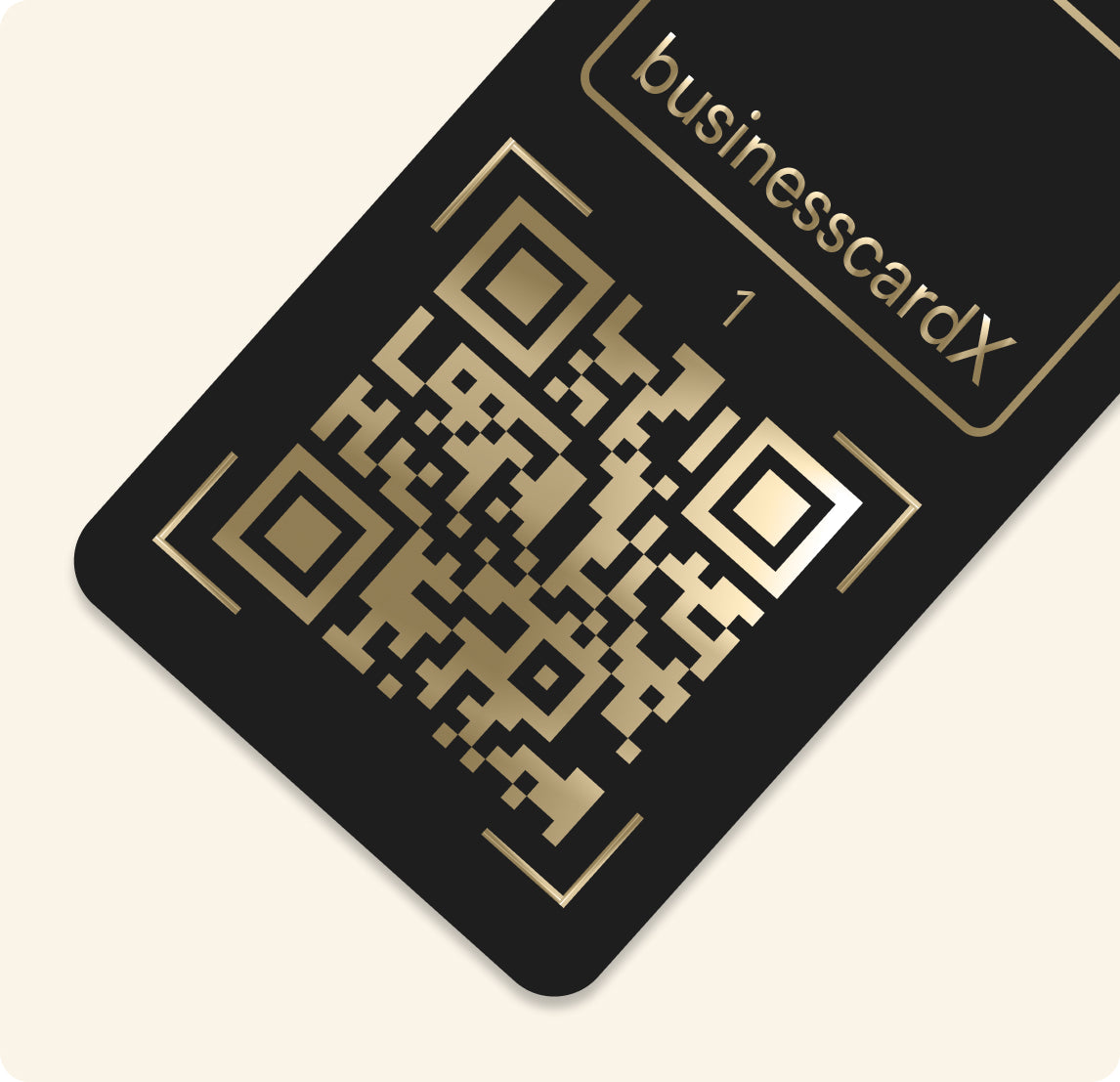
The bottom line: NFC wins in face-to-face interactions. The experience of tapping a card and having a profile appear instantly is seamless and impressive. QR codes win in one-to-many scenarios (a QR code on a conference booth banner, for example). The ideal solution — and what most NFC business card providers offer — is a physical card with NFC embedded and a QR code printed on it, plus a QR code in your digital profile for screen-to-screen sharing.
What to Look for When Choosing an NFC Business Card
Not all NFC business cards are created equal. Here are the factors that matter:
Card Material and Build Quality
The physical card is your first impression. Premium options include matte black PVC with metallic foil (gold, silver, or custom colors), brushed metal, bamboo, and carbon fiber. Avoid thin, flimsy cards that feel like credit card mailers — they undermine the premium impression you're trying to create. The card should feel substantial in the hand and signal quality before anyone even taps it.
Digital Profile Quality
The card itself is just a delivery mechanism. What matters is the digital profile it opens. Look for:
- Professional design that reflects well on your brand
- One-tap contact save (vCard download) — this is the most important feature
- Social links for all major platforms (LinkedIn, Instagram, X, TikTok, YouTube, etc.)
- Custom branding — your colors, your logo, your style
- Interactive map for your office or meeting location
- Mobile-optimized — the profile must look perfect on any phone screen
- Fast loading — if it takes more than 2 seconds, you've lost the moment
No App Required for Receivers
This is non-negotiable. If the person receiving your card needs to install an app to view your profile, you'll lose a significant percentage of potential contacts. The profile should open in a standard web browser — no app, no sign-up, no friction.
Pricing Model
NFC business card pricing generally falls into two models:
- Buy card + subscription: You purchase the physical card ($20–$80) and pay a monthly or annual fee ($5–$10/month) for the digital profile and features.
- Subscription includes card: You pay a monthly fee and the physical card is included. This tends to be simpler and more cost-effective over time. businesscardX uses this model — your premium NFC card is included with your plan.
Team Management
If you're evaluating NFC cards for a team or company, look for:
- Centralized admin portal to manage all employees' cards and profiles
- Brand consistency — enforce colors, logos, and layouts across the team
- Bulk onboarding — add new team members quickly
- Company-level analytics — see team-wide networking activity
- Per-seat pricing that scales reasonably
Bilingual Support
If you operate in a multilingual market (e.g., Canada with English and French), check whether the platform supports multiple language profiles. This is often overlooked but critically important for businesses in bilingual regions.
NFC Business Cards for Teams
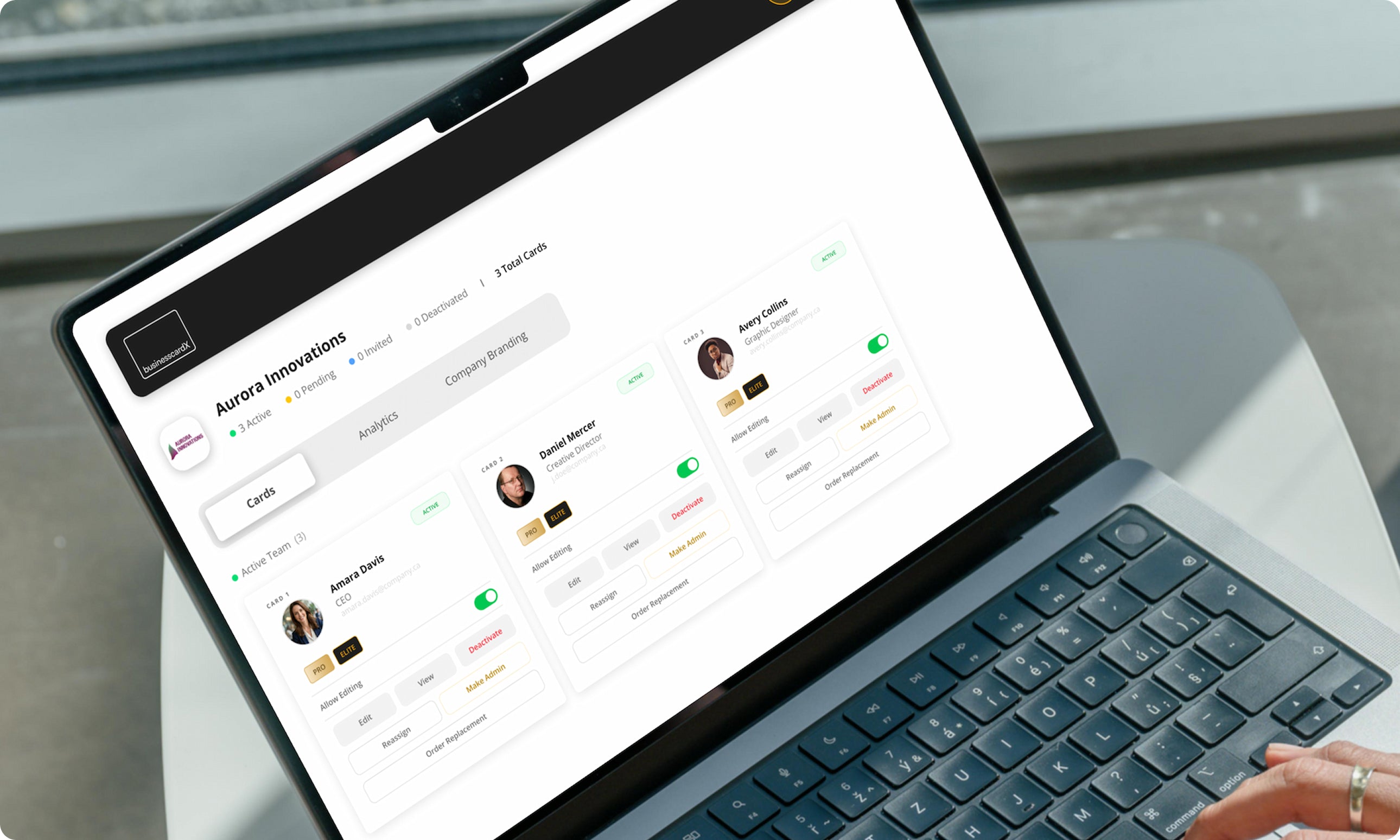
NFC business cards aren't just for individuals. For teams and organizations, they solve several persistent problems:
Brand Consistency
When every employee orders their own paper business cards, you end up with inconsistent designs, outdated logos, and varying quality. With an NFC business card platform, an admin sets the brand template — colors, logo, layout — and every employee's card automatically follows it. The brand presents consistently whether it's the CEO or a new hire.
Instant Onboarding
New employee? Set up their digital profile, assign them a card, and they're ready for their first meeting. No waiting 2-3 weeks for a box of printed cards to arrive from the printer.
Employee Turnover
When an employee leaves, their digital profile can be reassigned to their replacement. The same physical NFC card can be reprogrammed or replaced without waste. With paper cards, departing employees leave behind boxes of unused cards that go straight to recycling.
Centralized Analytics
Team-level analytics show which employees are actively networking, how many profile views the company is generating, and which events or channels drive the most connections. This data is valuable for sales teams, business development, and conference ROI analysis.
Cost Savings at Scale
A company of 50 employees typically spends $3,000–$10,000 per year on paper business cards (including design, printing, shipping, and the inevitable reorders for role changes, promotions, or office moves). An NFC business card platform for 50 users eliminates this cost almost entirely after the initial setup, while providing a dramatically better networking experience.
Managing a team? businesscardX ELITE gives you centralized control.
Learn about ELITE →How to Set Up Your NFC Business Card
Getting started with an NFC business card is straightforward:
- Choose a provider. Look for the features outlined in the previous section — card quality, profile design, no-app-required sharing, and transparent pricing. Consider whether you need individual or team features.
- Create your digital profile. Upload your photo, enter your contact details, add your social links, write a short bio, and configure your profile layout. Most platforms make this process take under 10 minutes.
- Receive your card. Your physical NFC card arrives pre-programmed and linked to your profile. Some providers include setup steps to activate the card; others ship it ready to use.
- Start sharing. At your next meeting, conference, or networking event, hold your card near the other person's phone. Watch their reaction when your profile appears instantly. Hand them the card for a moment if they want to browse your profile — then take it back. You only need one.
Pro tip: Practice the tap before your first event. The NFC antenna in most phones is located near the top-back of the device. A quick "hold the card against the back of your phone" instruction is all someone needs.
Frequently Asked Questions
Do NFC business cards need charging or batteries?
No. NFC tags are passive devices that draw power from the reading phone's electromagnetic field via inductive coupling.[2] There are no batteries, no charging, and no maintenance. Your NFC business card will work for 10+ years.
Does the other person need to install an app?
No. When someone taps your NFC business card, it opens a web page in their phone's default browser. No app download or installation is required. This works on both iPhone (XS and newer) and all modern Android phones.
How close does the phone need to be?
Within approximately 4 cm (about 1.5 inches). This is by design — NFC uses magnetic field induction rather than radio wave propagation, which naturally limits the range and makes the technology inherently secure.[2] In practice, touching the card to the back of the phone works best.
Can I have multiple profiles on one card?
This depends on the provider. Some platforms like businesscardX support multiple profiles (e.g., one for business and one personal) that you can switch between. The NFC chip itself stores a single URL, but that URL can point to a profile switcher or your primary profile.
Are NFC business cards secure?
Yes. The NFC tag in a business card is read-only — it only stores a URL to your profile page. It cannot access any data on the phone it's tapped against. It can't install software, read contacts, or access photos. The NFC tag simply broadcasts a web address, and the phone's operating system shows a confirmation prompt before opening it.
What if I want to change my information?
This is the biggest advantage of NFC business cards over paper. You log into your provider's platform, edit your profile, and click save. Every future tap of your card shows the updated information instantly. You never need a new card.
How long do NFC business cards last?
A high-quality NFC business card will last 10+ years. The NFC chip has no moving parts and no battery to degrade. The limiting factor is the physical card material — a well-made PVC or metal card is extremely durable under normal use.
Can NFC cards be cloned or hacked?
Business card NFC tags are typically read-only after manufacturing, which prevents tampering. Even if someone could read the tag data, all they'd get is the URL to your public profile — the same URL you're intentionally sharing with everyone you meet. There's no security risk beyond what you'd face by handing out a paper business card with the same URL printed on it.
Do NFC cards work through phone cases?
Yes, in most cases. NFC operates via magnetic field induction, which passes through thin non-metallic materials without difficulty. Standard silicone, plastic, and thin leather phone cases work fine. Very thick cases or cases with metal plates (e.g., magnetic car mount plates) may interfere with the signal.
Do NFC cards work with Apple Watch or smartwatches?
Some smartwatches have NFC capability, but it's typically restricted to payment functions (Apple Pay, Google Pay). Currently, reading NFC tags requires a smartphone.
Getting Started with businesscardX
Premium NFC business cards designed for professionals and teams who want to make exceptional first impressions.
- ✓ Premium NFC card (gold or silver)
- ✓ Digital profile page
- ✓ AI business card scanner
- ✓ CRM pipeline + auto follow-up
- ✓ Apple & Google Wallet
- ✓ Up to 5 profiles
- ✓ Branded QR codes
- ✓ Everything in PRO, plus:
- ✓ Admin portal + team management
- ✓ Custom company branding
- ✓ Free custom logo cards
- ✓ Team analytics rollup
- ✓ Bulk ordering
- ✓ Priority support
Sources & References
- Murray, A. (2021, September 6). "Has Covid killed off business cards for good?" BBC News. bbc.com — Reports roughly 7 billion business cards were printed worldwide annually.
- Wikipedia contributors. (2026). "Near-field communication." Wikipedia. en.wikipedia.org — NFC operates at 13.56 MHz; uses inductive coupling between loop antennas; passive targets draw operating power from the initiator's field.
- International Organization for Standardization. (2004). "ISO/IEC 18092:2004 — Near Field Communication — Interface and Protocol (NFCIP-1)." iso.org — Defines NFC data rates of 106, 212, and 424 kbit/s.
- International Organization for Standardization. "ISO/IEC 14443 — Contactless integrated circuit cards — Proximity cards." iso.org — International standard for contactless smart cards at 13.56 MHz.
- NFC Forum. (2004, March 18). "Nokia, Philips and Sony established the NFC Forum." nfc-forum.org — Founded March 18, 2004; over 120 member companies as of 2020.
- NFC Forum. (2024). "Core Specifications — The Building Blocks of Contactless." nfc-forum.org — Five NFC tag types with memory from 96 to 8,192 bytes.
- Nosowitz, D. (2011). "Everything You Need to Know About Near Field Communication." Popular Science. popsci.com — NFC connection setup time is under 0.1 seconds.
- Cook, J. "Apple Has Banned Apps From Using The iPhone 6's NFC Payment Chip." Business Insider. businessinsider.com — iPhone 6 was Apple's first NFC-enabled phone (2014).
- Hern, A. (2017). "The 10 biggest changes Apple didn't announce on stage at WWDC." The Guardian. theguardian.com — iOS 11 introduced third-party NFC tag reading.
- Wikipedia contributors. (2026). "Near-field communication — Devices." en.wikipedia.org — iOS 13 enabled background NFC tag reading on iPhone XS and later.
- Hindy, J. (2019). "Android Authority's big book of smartphone firsts!" Android Authority. androidauthority.com — Samsung Nexus S (2010): first Android phone with NFC.